What Are As-Built Drawings? What a Set Includes
As-built drawings are drawings of a building as it actually stands, with the dimensions and positions measured in the building rather than taken from the design set it was built from. The construction drawings show what was intended; the as-builts show what is there, after the field changes, the substitutions, the tenant fit-outs and the decades of small alterations that never reached a drawing. This guide explains what as-built drawings are, what an as-built set includes, how they differ from record drawings, how they are made today and what they are used for.
What as-built drawings are
The term is used two ways. On a construction project, “as-builts” often means the contractor’s marked-up set: the construction drawings with the changes made in the field drawn on them, handed to the owner at closeout. For an existing building, an as-built drawing means a drawing made by measuring the building as it stands, which is what an architect, an engineer or an owner needs when the original drawings are missing, out of date or not trusted. The two are related but not the same, and the guide to as-built vs record drawings explains who prepares each and what it is checked against.
The rest of this guide is about the second kind: drawings of an existing building, measured in the building.
As-built drawings vs construction drawings
Construction drawings, the design set, show what the architect and the engineers intended and what the contractor was asked to build. As-built drawings show what was actually built. On a new building the two differ by the field changes made during construction; on an older building they can differ by decades of alterations. A design for new work should start from the as-builts, because the construction drawings describe a building that may no longer exist.
What an as-built set includes
The sheets follow from the decision the drawings are for, so the list is agreed before the work starts. A typical set for a building or a floor includes:
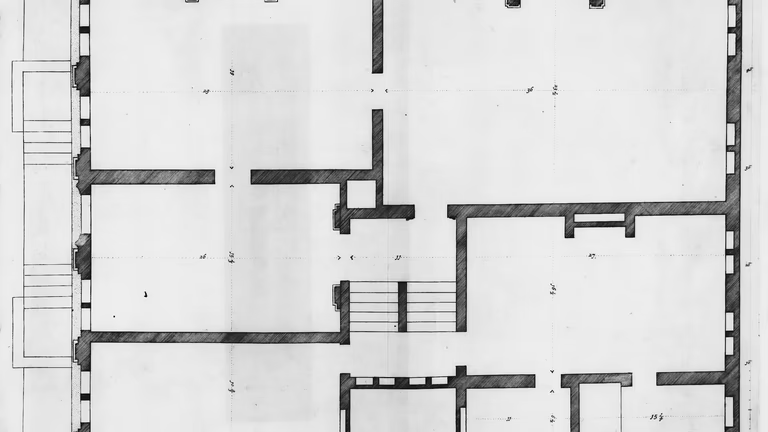
- Floor plans with the walls, doors, windows, stairs, columns and fixed fixtures, dimensioned and tied to the building grid.
- Reflected ceiling plans with the ceiling heights and grids, the lights, the diffusers, the sprinkler heads and the soffits.
- Exterior and interior elevations with the openings, the finishes and the heights.
- Building sections through the floor-to-floor heights, the slabs, the roof structure and the ceiling cavities.
- Roof and site plans with the roof penetrations and equipment, the paving and the curbs, when the exterior is in scope.
The sheets are delivered in DWG and PDF, and a good set says on each sheet which lines were measured and which were taken from other documents. When the design will be done in Revit, the same measurements become a 3D model of the building instead of the drawings or on top of them, described on the scan-to-BIM page.
How as-built drawings are made
A tape survey records the dimensions someone decides to take on the day, straightens what it cannot describe, and leaves the ceiling to a sketch. Today most as-builts of existing buildings are traced from a laser scan. A terrestrial scanner of the Trimble X7 class measures up to 500,000 points a second with a 3D point accuracy of 2.4 mm at 10 m and 3.5 mm at 20 m (one standard deviation) by its datasheet. It is set up room by room, the stations are registered into one point cloud, and the drawings are traced from that cloud. Because the scan records everything in line of sight, a question that comes up a month later, the height of a window head or the offset of a column from the grid, is answered from the cloud without a second visit.
The accuracy of the drawings is stated in the U.S. Institute of Building Documentation’s Level of Accuracy terms, as a standard deviation at the 95 percent confidence level; a typical renovation set is drawn to LOA30, a deviation between 15 mm and 5 mm. What the scanner cannot see, the framing behind a finish or a pipe above a hard ceiling, is shown only where an existing drawing shows it, and marked as unverified.
What as-built drawings are used for
Most sets are ordered for a decision. A renovation or an addition is designed on them. A tenant improvement is drawn on them, and the TI guide covers that case. A permit application for work in an existing building usually needs existing-conditions sheets, and what your building department asks for is the architect’s to confirm. A lease exhibit, a facility with no drawings at all, a property sale or a refinancing all start from knowing what is there. The registered point cloud the drawings are traced from is delivered with them, so the next project starts from the same measured record.
Price and time
Price follows the area, the number of sheets and how cluttered the space is. Typical ranges from recent projects: a house or an apartment, scanned and drawn, $2,000 to $4,500; interiors with the facades and the site, $2,500 to $5,000; an office or a commercial floor, $3,000 to $9,000; large buildings from $12,000, quoted on their own. The guide to as-built drawings cost explains what moves the price. The quote arrives within one business day of your sending the address and the sheets you need. A house or a floor is usually scanned in a day, and the drawings usually follow in two to three weeks for a house and in four to eight weeks for a commercial floor or a whole building. The as-built drawings page describes the service, and we scan in all 50 states.
FAQ
What is the difference between as-built drawings and construction drawings?
Construction drawings show the design that was meant to be built; as-built drawings show what was actually built, measured or recorded after the fact.
What are examples of as-built drawings?
A floor plan of an existing office measured for a tenant improvement, a reflected ceiling plan of a school before a lighting retrofit, elevations of a historic facade before restoration, or a contractor’s marked-up set handed over at closeout.
What are as-built drawings?
Drawings of a building as it actually stands, with the dimensions and positions measured in the building rather than taken from the original design set.
What is included in an as-built set?
Usually floor plans, reflected ceiling plans, elevations and sections, plus roof and site plans when the exterior is in scope, in DWG and PDF. The list is agreed before the work starts.
Who prepares as-built drawings?
On a construction project the contractor marks up the construction set. For an existing building, as-builts are made by measuring the building, today usually from a laser scan.
How accurate are as-built drawings?
As accurate as the measurement they are traced from. From a laser scan, a typical renovation set is drawn to USIBD LOA30, a deviation between 15 mm and 5 mm at the 95 percent confidence level.
How much do as-built drawings cost?
A house or an apartment usually $2,000 to $4,500, an office or a commercial floor $3,000 to $9,000, large buildings from $12,000. The quote arrives within one business day.
Sources
- Trimble X7 3D laser scanning system datasheet: scan speed and 3D point accuracy.
- USIBD Document C120, Level of Accuracy Specification Guide, version 2.0 (2016): the LOA levels as standard deviations at the 95 percent confidence level.