Scan-to-CAD vs Scan-to-BIM: Which Deliverable Do You Need?
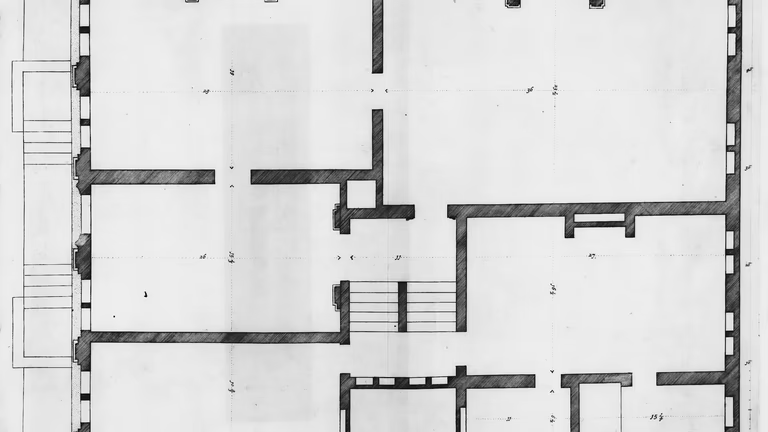
Scan-to-CAD produces drawings: plans, sections, elevations and reflected ceiling plans in DWG and PDF, traced from a laser scan. Scan-to-BIM produces a model, usually a Revit file, in which the walls, floors, doors and other elements are built as building components against the same scan. Both start from the same registered point cloud, so the choice is not between a cheaper and a better product; it is about who opens the file after delivery and what they do with it. If your team works in drawings, you need CAD. If it designs or coordinates in Revit, you need BIM. This guide sets the two side by side.
The scan is the same; the fork is afterwards
The field work does not change with the deliverable. The building is scanned station by station with a terrestrial scanner of the Trimble X7 class, which by its datasheet holds a 3D point accuracy of 2.4 mm at 10 m (one standard deviation), the stations are registered into one point cloud and checked before we leave the site, and the cloud is delivered in E57, the ASTM exchange format for 3D imaging data, and in RCP/RCS for Revit, with its registration report. A house or a floor is usually scanned in a day.
What changes is what is built on the cloud. Scan-to-CAD traces it into 2D line work on sheets; scan-to-BIM rebuilds it as modeled elements with categories, levels and relationships. The cloud is the asset, and the two are ways of turning it into something your software can use, so a building can be scanned once and the deliverable decided later, or both ordered from the one scan.
What scan-to-CAD delivers
A drawing set traced from the cloud: floor plans, reflected ceiling plans, interior and exterior elevations, building sections, roof and site plans, as layered DWG files and PDF sheets, with the sheet saying which lines were measured and which were taken from other documents. The drawings carry dimensions and annotation but no model intelligence: a wall is a set of lines, not an object that knows its height or what it connects to. The accuracy of the line work is stated in the U.S. Institute of Building Documentation’s Level of Accuracy terms, as a standard deviation at the 95 percent confidence level; a typical renovation set is drawn to LOA30, between 15 mm and 5 mm.
CAD is the right answer when the people downstream work in AutoCAD, when an owner needs a measured record set, when a contractor needs the existing wall locations to price work, or when a lease plan or a test fit is all the project needs. The as-built drawings page describes the set, and the guide to as-built vs record drawings explains what a measured set is and is not.
What scan-to-BIM delivers
A model of the existing building, most often in Revit, with the cloud linked in, the levels set up and the elements modeled as components: walls, floors, doors, windows, stairs, the visible columns and beams, and the mechanical, electrical and plumbing systems when they are in scope. Because each element is an object, the model supports schedules, clash detection against a new design, and coordination between disciplines, and it is updated as the design progresses. The level of development is set per element category in the BIMForum Level of Development Specification’s terms, LOD 300 for most orders, where an element is represented “such that its quantity, size, shape, location, and orientation can be measured”, LOD 200 for massing and LOD 350 for the elements new work has to meet. The model goes out as a Revit file in your version, or as IFC, the open standard ISO 16739-1:2024, or an ArchiCAD file when your team does not use Revit.
That intelligence is the reason to buy a model, and it only pays when someone uses it. If the design team works in Revit and builds on the existing conditions, a model saves it from re-tracing the building by hand; if nobody will open it in Revit, it is an expensive way to get a floor plan. The scan-to-BIM page describes the scope, and the guide to LOD 200 vs LOD 300 for a renovation shows the levels on real elements.
Decide by who opens the file
Ask which software opens the file and what decision it supports. DWG floor plans or PDF as-built sheets, elevation or section line work, a lease plan, a test fit, a contractor’s reference, an owner’s record set: scan-to-CAD. A Revit design base built on the existing conditions, clash coordination across disciplines, schedules and model data, a model that will keep being updated: scan-to-BIM. Most projects land mostly on one side with a few items on the other, which is a sign to split the deliverables rather than make one file do everything: the drawings for the landlord’s record and the model for the design team, cut from the same cloud. If the downstream user works in AutoCAD, a Revit model makes work for them; if they design in Revit, a CAD background means someone re-traces it into the model.
Getting either one right
A DWG has to be organized for the next team to build on, and the cheapest way to get that right is to agree the standard before drafting starts: the drawing list, units, DWG version, layer standard, line weights, title block, sheet size, scale, and how much is dimensioned. If your office has a CAD standard or a template, send it with the order. A model has the equivalent conversation: the Revit version, the element categories in scope, the LOD per category, the accuracy, and how the cloud is linked. In both cases the scope names what is excluded, usually the concealed systems, furniture and loose equipment, so the deliverable does not drift into work nobody priced.
Price and time
Price follows the area, the number of stations and what is built on the cloud, and the typical ranges from recent projects are the same for a drawing set or a model: a house or an apartment, $2,000 to $4,500; interiors with the facades and the site, $2,500 to $5,000; an office or a commercial floor, $3,000 to $9,000; large buildings from $12,000, quoted on their own; the point cloud alone from about $1,200. Within a range, a drawing set takes less production time than a model, and a model with the systems sits at the top. The quote arrives within one business day of your sending the address and the deliverables you need. Drawings or a model usually follow in two to three weeks for a house and four to eight weeks for a commercial floor or a whole building. We scan in all 50 states.
FAQ
What is the difference between scan-to-CAD and scan-to-BIM?
Scan-to-CAD produces 2D drawings in DWG and PDF traced from the point cloud; scan-to-BIM produces a Revit model whose elements are built as components against the same cloud. The scan is the same; the deliverable depends on who uses it.
Which one do I need?
If your team works in AutoCAD or needs a record set, drawings. If it designs or coordinates in Revit, a model. If both, split the deliverables and cut both from one scan.
Can I get drawings from the model?
Yes. Plans, sections and elevations are cut from the model when they are in scope, and quoted with it.
Is scan-to-CAD cheaper?
Usually, since a drawing set takes less production time than a model, but the ranges overlap and depend on the area and what is drawn or modeled. A house with either usually runs $2,000 to $4,500.
Can I decide later?
Yes. The registered point cloud is delivered with its report, and either deliverable is built from it when the project needs it, without a second visit.
Sources
- Trimble X7 3D laser scanning system datasheet: 3D point accuracy.
- USIBD Document C120, Level of Accuracy Specification Guide, version 2.0 (2016): the LOA levels as standard deviations at the 95 percent confidence level.
- BIMForum, Level of Development Specification 2023, Part I: the LOD 300 definition.
- buildingSMART, Industry Foundation Classes (IFC): an introduction, ISO 16739-1:2024
- ASTM E2807, Standard Specification for 3D Imaging Data Exchange: the E57 file format.
- Autodesk Revit help: linked point clouds require indexed RCP or RCS files